
September 12, 2026
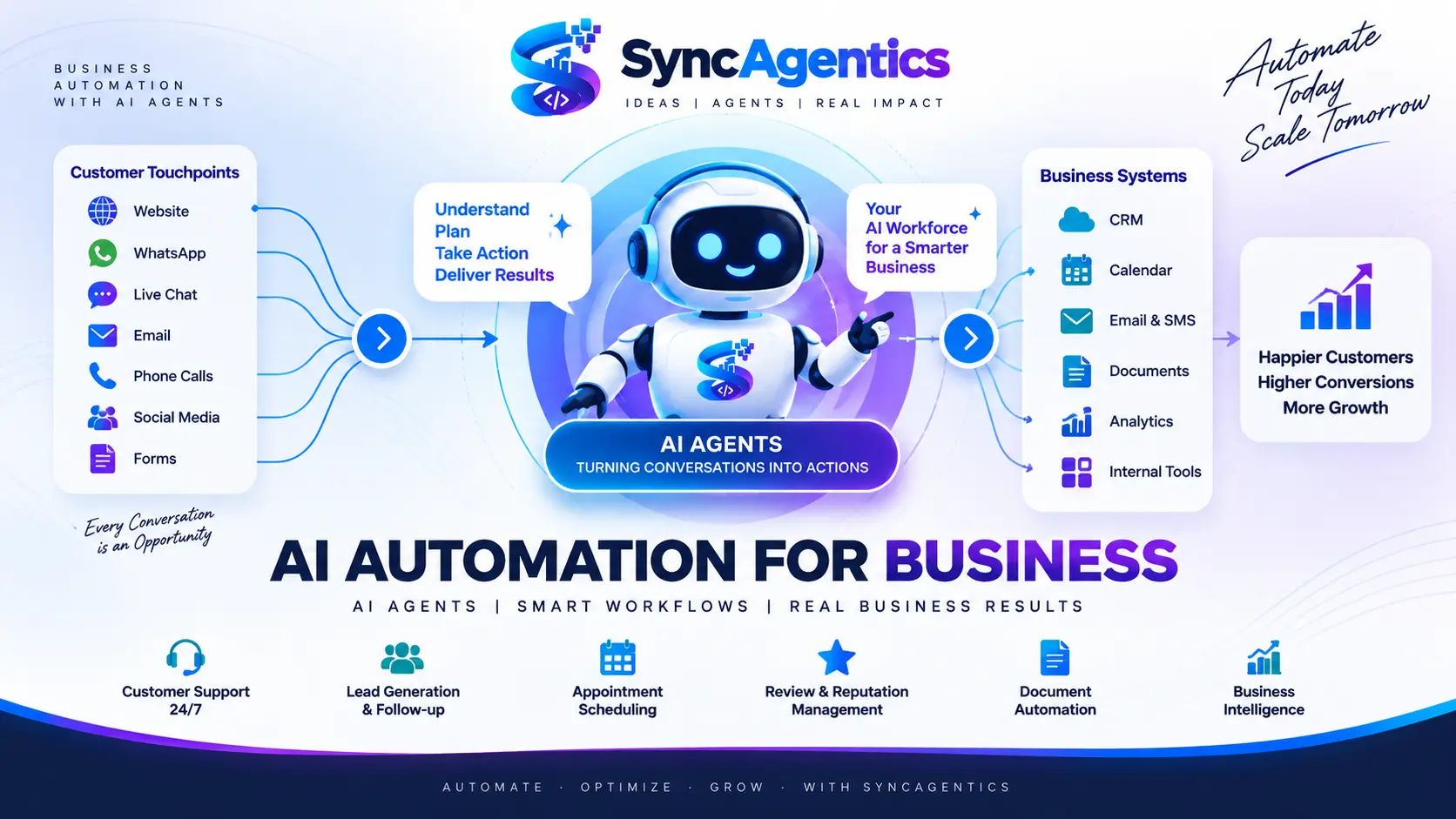
Businesses are no longer asking whether artificial intelligence will affect the way they work.
The more useful question is: which parts of the business should AI actually handle?
For years, business automation mostly meant connecting predefined rules: when something happens, perform a predefined action. Chatbots could answer questions, forms could trigger emails and software could move information between systems. Employees still managed much of the process.
Modern AI automation is different. It combines AI models, business rules, software integrations and, increasingly, AI agents that can interpret requests and perform multiple steps within defined boundaries.
That creates an opportunity to automate more than isolated tasks. Businesses can redesign entire workflows around faster response, better follow-up, less repetitive work and more useful access to information.
This guide explains what AI automation for business means, how AI agents fit into it, where it can create value, what should remain human-led and how to approach implementation responsibly.
What Is AI Automation for Business?
AI automation for business is the use of artificial intelligence together with automation logic and connected systems to perform business tasks and workflows with less manual intervention.
A traditional automation might follow a fixed rule:
If X happens → perform Y.
An AI-enabled workflow can interpret a less predictable input before deciding what approved action should happen next.
For example:
Customer message → understand intent → retrieve approved information → determine the workflow → take an authorized action → record the result → escalate when necessary.
The important distinction is that AI can add interpretation to the workflow. Traditional automation remains valuable for deterministic steps; AI can handle language, classification and other areas where inputs vary.
Common AI automation capabilities include:
• understanding natural-language requests
• classifying conversations and documents
• qualifying leads
• answering routine customer questions
• collecting information
• scheduling appointments
• sending reminders
• updating CRM records
• extracting information from documents
• summarizing conversations
• routing work
• generating reports
• identifying patterns or anomalies
• triggering follow-up workflows
• escalating exceptions to people
AI Automation vs. Traditional Automation
Traditional automation is not obsolete. In a well-designed system, deterministic automation and AI often work together.
Traditional automation is strongest when the process is predictable. For example, a completed appointment can trigger a confirmation email according to a fixed rule.
AI becomes useful when the input is less structured. A customer might explain their needs in their own words, attach a document or ask a question that requires context.
A useful architecture therefore looks less like “AI replaces automation” and more like:
AI interprets → business rules constrain → integrations execute → humans handle exceptions.
What Are AI Agents?
An AI agent is an AI system designed to pursue a defined objective by interpreting information, selecting appropriate actions and using available tools within specified permissions.
A simple chatbot might answer a question. An AI agent can potentially answer the question and then perform a related action—such as checking availability, creating a record or initiating an approved workflow.
The exact capability depends on the system design. An AI agent should not be treated as automatically autonomous or automatically reliable. Its tools, permissions, data sources, instructions, monitoring and escalation rules determine what it can safely do.
A practical distinction is:
Chatbot — primarily communicates.
Automation — primarily follows predefined rules.
AI agent — can interpret a goal and take multiple approved actions using tools.
What Is Agentic AI?
Agentic AI describes AI systems that can work toward an objective through multiple steps rather than producing only a single response.
A simple interaction might be:
Question → Answer
An agentic workflow might be:
Goal → Understand → Plan → Use tools → Act → Check result → Continue or escalate
For a business, this matters because many useful processes are multi-step. Lead qualification, appointment scheduling, document processing and customer-service escalation can involve several systems and decisions.
The practical objective should not be maximum autonomy. It should be the right level of autonomy for the risk and complexity of the workflow.
Why AI Automation Matters for Businesses
The strongest business case for AI automation is not that AI is impressive. It is that a well-designed workflow can improve a measurable business outcome.
Potential outcomes include:
• reducing repetitive employee workload
• improving response times
• increasing consistency of follow-up
• reducing manual data entry
• shortening document-processing cycles
• making business information easier to access
• improving appointment handling
• helping sales teams respond faster
• improving operational visibility
However, AI automation does not automatically create ROI. A workflow needs a clear business objective, suitable data, reliable integrations and a way to measure whether the change helped.
Our Practical Approach to AI Automation
At SyncAgentics, the useful starting point is the business process—not the AI model.
Before automating a workflow, consider five questions:
1. What is the current process?
2. Where is time or revenue being lost?
3. Which steps genuinely require AI rather than simple rules?
4. What systems and information are required?
5. Where should a human remain responsible?
This approach avoids a common failure mode: purchasing an AI tool and then searching for a problem to justify it.
A good automation should have a defined owner, a defined workflow, clear permissions, measurable outcomes and an escalation path.
The SyncAgentics Automation Readiness Framework
Use this simple framework to score a process before deciding whether to automate it. Rate each factor from 1 to 5.
Volume — How frequently does the process occur?
Repetition — How similar are the requests?
Data readiness — Is the information needed for the workflow accessible and reliable?
Integration readiness — Can the required systems connect?
Risk — What is the consequence of an incorrect action?
Measurement — Can the business outcome be measured?
Human escalation — Is there a clear route to a person when needed?
A process with high volume, high repetition, accessible data, workable integrations and measurable outcomes can be a strong candidate. A process with high consequences and complex professional judgment may require human-led decision-making even when AI assists with preparation.
This is a prioritization framework, not a guarantee that a process should be automated. Each implementation needs its own technical, operational and risk assessment.
10 Practical AI Automation Use Cases for Business
1. AI Customer Support
AI customer support can help with repetitive questions, product or service information, basic troubleshooting, appointment questions, policies, information collection, routing and escalation.
The strongest design keeps a clear human path. AI can handle routine interactions while employees handle sensitive, unusual or high-value cases.
2. AI Lead Capture and Qualification
AI can respond to incoming enquiries, collect contact details, understand requirements, ask qualifying questions, update a CRM and trigger follow-up or appointment workflows.
A useful pattern is: Visitor → Conversation → Qualification → CRM → Follow-up → Appointment → Sales team.
3. AI Appointment Scheduling
Appointment workflows can combine conversation, intake, calendar availability, booking, confirmation, reminders and rescheduling.
4. AI Receptionist and Voice Agents
AI voice systems can assist with defined phone workflows such as answering common questions, collecting information, qualifying enquiries, scheduling and routing calls.
Voice automation needs particularly clear escalation rules because callers may expect immediate human assistance when a situation becomes complex.
5. AI Review and Reputation Management
AI can support review requests, feedback organization, sentiment analysis, response drafting and internal alerts. The objective should be to listen and respond consistently—not to manufacture positive reviews.
AI Review & Reputation Manager
6. AI Document Automation
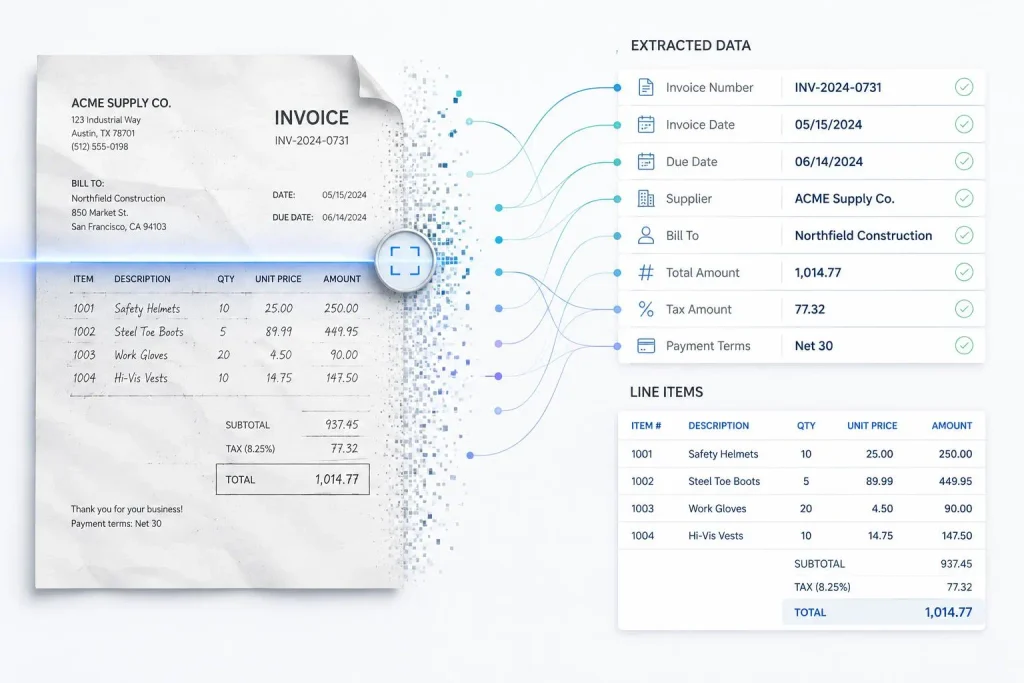
AI document automation can assist with classification, data extraction, validation and routing across invoices, forms, reports, PDFs and other business documents.
A typical workflow is: Document received → classify → extract → validate → approve → update system.
7. AI Business Intelligence
AI-powered business intelligence can make business data easier to query and summarize. Users can ask questions in natural language and receive information that would otherwise require navigating multiple reports or datasets.
AI should support decisions with traceable data and appropriate validation; it should not be treated as an unquestionable source of truth.
8. AI Workflow Automation
The highest-value opportunity may be connecting multiple systems into one workflow: website → AI agent → CRM → calendar → communication → internal notification → analytics.
The value comes from the end-to-end process, not from any individual tool.
9. AI Internal Operations
Internal use cases can include knowledge search, report preparation, meeting summaries, task creation, data entry, document routing, internal requests and operational alerts.
10. Industry-Specific AI Automation
The best workflow depends on the industry. Pharmacy, clinics, retail, real estate, restaurants and legal teams have different customer journeys, data requirements and risk considerations.
AI Automation by Industry
Pharmacies
Potential applications include customer questions, appointment workflows, administrative communication, document processing, review management and reporting. Human professionals should remain responsible for regulated or clinical decisions.
Clinics
Potential applications include scheduling, patient communication, intake, reminders and administrative workflows. Healthcare workflows require careful treatment of privacy, safety and professional judgment.
Retail
Potential applications include customer support, product enquiries, lead capture, follow-up, reviews and reporting.
Real Estate
Potential applications include lead capture, qualification, property enquiries, follow-up, appointment scheduling and customer communication.
Restaurants and Cafés
Potential applications include customer questions, booking requests, feedback, review requests and repetitive communication.
Legal
Potential applications include client intake, scheduling, document workflows, administrative communication and lead qualification. Legal judgment and professional advice should remain appropriately supervised.
How to Choose What to Automate First
Start with a process that is repetitive, frequent, measurable and important enough to justify improvement.
Good candidates often have a clear beginning and end, accessible information, manageable risk and a defined owner.
Be cautious with processes where an error could create significant legal, medical, financial or reputational consequences. AI may still assist, but the workflow should include appropriate human review.
The best first automation is often not the most technically impressive one. It is the one where the business can clearly measure improvement.
Human-in-the-Loop AI Automation
Human oversight is not a sign that automation failed. It is often an intentional part of a robust system.
AI can handle speed, scale, classification, retrieval and routine workflow actions. People can handle judgment, empathy, accountability, negotiation, exceptions and sensitive decisions.
A useful design question is: what should happen when the AI is uncertain?
Possible answers include asking for more information, stopping the workflow, routing to an employee or requiring approval before a consequential action.
AI Automation Security, Governance and Guardrails
AI agents can potentially interact with business systems and therefore need appropriate controls.
A production workflow should consider:
• authentication and authorization
• least-privilege access
• data handling and retention
• sensitive information
• audit logs
• human approval
• error handling
• escalation
• monitoring
• fallback procedures
• testing before deployment
The more powerful the action, the more important the controls. A system that drafts an email has different risk from one that changes financial records or makes a regulated decision.
AI Automation and Existing Business Software
Businesses rarely need to replace every existing system to introduce AI automation.
AI workflows can potentially connect websites, CRM platforms, calendars, email, forms, help desks, databases, spreadsheets, document systems and analytics platforms.
The architecture should be designed around the process. Choose integrations because they support the workflow, not because a particular tool is fashionable.
How to Measure AI Automation ROI
Measure business outcomes rather than AI activity.
Time saved = hours automated × relevant employee cost per hour.
Revenue opportunity = additional qualified leads × conversion rate × average customer value.
Support efficiency = interactions automated × average cost per interaction.
Appointment impact = additional completed bookings × estimated value per booking.
Document processing benefit = documents processed × manual processing time avoided.
Then account for implementation, software, maintenance, monitoring and human-review costs.
These formulas are planning models, not guarantees. Use your own verified business data when calculating ROI.
Common AI Automation Mistakes
Mistake 1: Starting with the technology instead of the problem. Start with the workflow and outcome.
Mistake 2: Automating everything. Use conventional rules where they are sufficient and AI where interpretation adds value.
Mistake 3: Calling every chatbot an AI agent. Define the system by what it can actually do, which tools it can use and what permissions it has.
Mistake 4: Removing human escalation. Make it easy to involve a person when the workflow reaches its limits.
Mistake 5: Measuring message volume instead of outcomes. Measure response time, conversions, workload, processing time and customer outcomes.
Mistake 6: Ignoring data quality. Poor information can produce poor automation regardless of how capable the AI model is.
Mistake 7: Giving agents excessive permissions. Use the smallest set of permissions required for the job.
A Practical AI Automation Roadmap
Phase 1 — Discover
Document the current workflow, bottlenecks, manual effort and business outcome.
Phase 2 — Prioritize
Score candidate workflows by impact, frequency, feasibility and risk.
Phase 3 — Design
Define AI responsibilities, rules, integrations, data sources, permissions, human approval points and escalation paths.
Phase 4 — Deploy
Launch a focused workflow and test it against real but appropriately controlled scenarios.
Phase 5 — Measure
Monitor accuracy, completion rate, response time, conversion, satisfaction, time saved and escalation rate.
Phase 6 — Optimize
Improve the workflow based on observed performance, then expand to adjacent processes when the foundation is reliable.
What AI Automation May Look Like Next
The next stage of business AI is likely to involve more specialized agents, more connected workflows and more human-AI collaboration.
Instead of one general chatbot, a business may use different AI systems for support, lead qualification, appointment handling, document processing and analytics, with automation connecting the workflows.
The important shift is from AI as a destination to AI as an operational layer.
The Future Is Not AI vs. Humans
The better question is how humans and AI should divide the work.
AI can qualify leads while salespeople handle high-value opportunities. AI can extract document data while employees verify exceptions. AI can prepare a report while management interprets the business implications.
The objective is not to remove people from every process. It is to remove unnecessary friction and give people better systems for the work that requires them.
How SyncAgentics Approaches AI Automation
SyncAgentics focuses on practical AI agents and business automation workflows rather than AI for its own sake.
The service ecosystem can include AI customer support, AI lead capture and follow-up, AI appointment automation, AI reputation management, AI document automation and AI business intelligence.
The implementation principle is simple: understand the business problem, design the workflow, connect the required systems, establish boundaries, measure the outcome and improve the system over time.
Explore AI Automation Services
Frequently Asked Questions
What is AI automation for business?
AI automation for business combines AI with automation logic and connected systems to perform suitable business tasks and workflows with less manual intervention.
What is an AI agent?
An AI agent is an AI system designed to pursue a defined objective by interpreting information, using tools and taking approved actions within specified boundaries.
What is the difference between AI automation and AI agents?
AI automation is the broader practice of automating business processes with technology. AI agents are one approach for making workflows more adaptive and capable of multi-step actions.
Can small businesses use AI automation?
Yes. Small businesses can start with focused workflows such as lead capture, customer support, appointment scheduling, follow-up, reviews or document processing.
Is AI automation expensive?
Cost depends on the workflow, integrations, data, AI models, testing and ongoing support. A focused workflow can be much simpler than attempting to automate an entire operation.
Will AI automation replace employees?
Not necessarily. Many implementations are designed to remove repetitive work while keeping employees responsible for judgment, relationships and exceptions.
Is AI automation secure?
AI automation can be designed with security controls, but security is not automatic. Access, permissions, data handling, monitoring, auditability and human approval should be considered during implementation.
What should a business automate first?
Start with a repetitive, measurable and sufficiently important process where the inputs and outcome are reasonably well understood.
Sources & Further Reading
Use authoritative sources to support changing AI claims and keep this article current. Recommended references include Google Cloud research on AI agents and agentic workflows, Gartner research on AI in customer service and agentic systems, NIST guidance on AI risk management, and Google Search Central guidance on creating helpful, reliable, people-first content.
Recommended source links:
Google Cloud — AI agent and agentic workflow research
Gartner — AI, customer service and agentic AI research
NIST — AI Risk Management Framework
Google Search Central — Creating helpful, reliable, people-first content
Final Takeaway
AI automation is moving beyond simple chatbots and isolated productivity tools.
The bigger opportunity is to build AI-powered business workflows that can understand requests, access appropriate information, use connected tools, take approved actions and involve people when human judgment is required.
The businesses that benefit most will not necessarily be the ones using the most AI. They will be the ones that identify the right processes, establish sensible human-AI boundaries and measure the resulting business outcomes.
Identify the bottleneck → Design the workflow → Add AI where it creates value → Connect the necessary systems → Establish guardrails → Measure the outcome → Improve and scale.
That is the foundation of practical AI automation for business.
Start With Your Highest-Value Workflow
If your business has repetitive customer conversations, lost leads, manual appointment scheduling, document-heavy processes or disconnected business data, the first step isn’t necessarily buying another AI tool.
It’s identifying which workflow is worth improving first.